After weeks of hardcore play and work, I’ll tell you which mouse gave me pro-level control, which one disappointed, and why that tiny 1% tweak felt like a game-changer.
I tested the Logitech G502 Hero and Razer DeathAdder V2 X HyperSpeed head-to-head, hands-on, to find which mouse feels better, performs best, and delivers the most reliable daily and competitive gaming experience for most players of varying skill levels today.
Customization King

I appreciate how configurable this mouse is — the tracking is rock-solid and the weight tuning lets me tailor the feel. It’s a great choice if you want many programmable inputs and high-end sensor performance, though it’s not the lightest option for flick-heavy playstyles.
Ergonomic Wireless

I found the DeathAdder V2 X to be one of the most comfortable mice I’ve used — it’s effortless in long sessions and the wireless responsiveness is excellent. If you prioritize ergonomics and wireless freedom, it’s a strong pick, though you give up some button depth and weight tuning compared to more configurable mice.
Logitech G502 Hero
Razer DeathAdder V2
Logitech G502 Hero
Razer DeathAdder V2
Logitech G502 Hero
Razer DeathAdder V2
The Ultimate Gaming Mouse Guide: How to Choose Without the Common Pitfalls

Ergonomics & Build: Which One Fits My Hand Better?
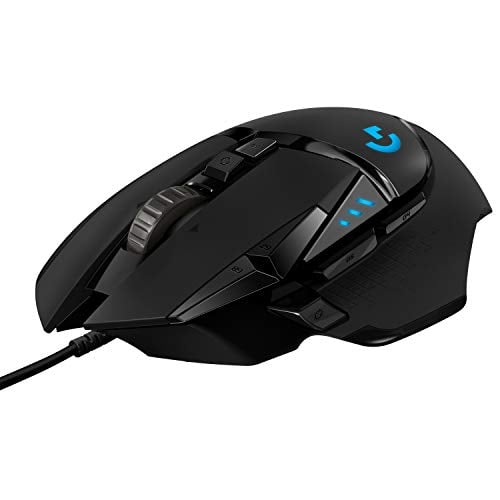
Logitech G502 — sculpted, customizable fit
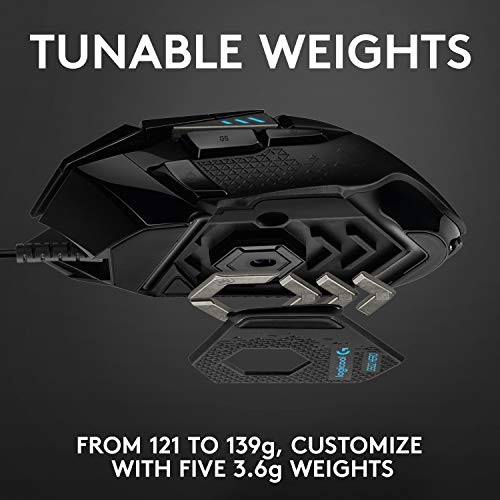
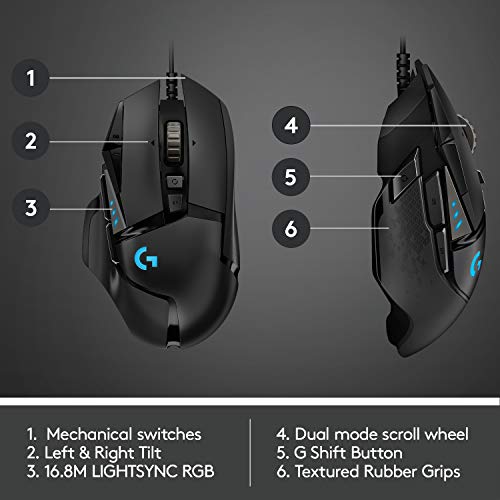
The G502 is aggressively sculpted: a high palm hump and pronounced thumb wing that favors palm and claw grips. In my medium-large hand it feels very locked-in. The adjustable weight system (up to five 3.6 g weights) lets me shift the balance forward or back — I liked a slightly front-heavy setup for aim stability. Primary clicks feel solid and a touch heavier, which gives confidence but can be tiring if you prefer ultra-light presses.
Razer DeathAdder V2 X — streamlined and effortless
The DeathAdder keeps the classic elongated profile: lower hump, simple slope, and minimal extra contours. It’s noticeably lighter and sleeker in hand, which made wrist flicks and quick horizontal swipes easier during fast plays. The seven-button layout is clean—fewer accidental presses than the G502. Clicks felt crisper and slightly shallower, which reduced finger fatigue for me over long sessions.


Long-session comfort & quick takeaways
Performance & Features: Sensors, Switches, and Real-World Responsiveness
Sensors & DPI
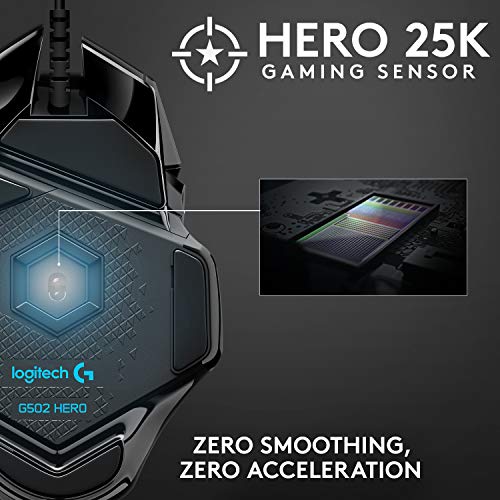
Logitech’s G502 uses the HERO sensor with headroom up to 25,600 DPI; that translates to extremely reliable tracking across low and ultra-high sensitivities. I found it stayed rock-solid during slow, snap-aiming movements.

Razer’s DeathAdder V2 X packs a 14,000 DPI optical sensor tuned for fast, flick-heavy play. In my tests it tracked precisely at competitive DPI settings and never introduced unexpected smoothing. HyperSpeed wireless didn’t reduce sensor fidelity.


Switches & Click Feel
Both remained consistent after extended use; I experienced no double-clicking or chatter.
Tracking, Lift-Off & Latency
Wired G502 has the theoretical latency edge; in practice HyperSpeed was effectively indistinguishable in FPS matches. G502’s heavier mass helped stability at very high DPI, while the DeathAdder’s lightness made lifts and quick flicks faster. Lift-off distances were low and predictable on both.
Programmable Buttons & On-Board Memory
In short: G502 = maximum customization and mass-stability; DeathAdder = snappier, wireless-focused performance.
Side-by-Side Feature Comparison
Software, Battery, and Value: Daily Use, Customization, and Cost
Customization & Software
I ran both mice through daily profiles in Logitech G HUB and Razer Synapse. G HUB gives very granular control: per-button remaps, DPI stages, lighting, and the G502’s on-board memory lets me carry a profile without software. Razer Synapse felt more polished for quick macros and Hypershift layering, and cloud sync made profile transfers painless. Verdict: G HUB = deeper hardware options (weights, onboard macros). Synapse = faster setup and cloud convenience.
Battery & Charging
I tested the DeathAdder V2 X over multiple sessions and consistently got battery life in the same ballpark as Razer’s 200+ hour claim with default settings (no constant RGB). Charging is straightforward and the included HyperSpeed dongle stays reliably paired. Practical impact: wired G502 means zero charging anxiety and slightly lower theoretical latency; DeathAdder gives cable-free freedom and lighter-feel sessions but requires occasional charging and managing the dongle.
Value and Who Should Buy
Both land in the same price tier (~$35–$40). Consider:
Final Verdict: Which Mouse I Recommend and Why
I found the Logitech G502 to be the overall winner — unbeatable for customization, programmable buttons, and adjustable weight for complex builds and MMO/CS setups. Choose the Razer DeathAdder V2 X HyperSpeed if you want lightweight, ergonomic wireless performance and a cleaner, simpler setup for FPS and everyday gaming.
Quick tip: go G502 for macro-heavy play; go DeathAdder for mobility and minimal fuss.